How to Choose the Best Router for Exceptional Browsing
What are the important specifications when buying a router? What differentiates routers from each other? Learn the most important standards you need t

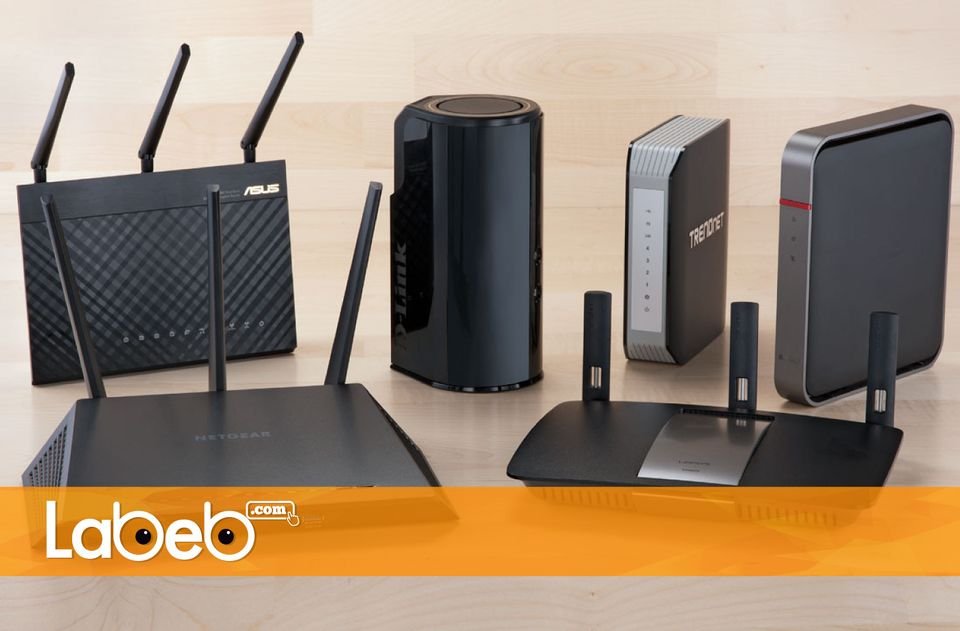





There are many factors and standards we must pay attention to when purchasing a router. A router is a device that distributes and connects different devices - smartphones to laptops - to the internet. This article will help you choose the right router for browsing the internet.
Routers or wireless routers are available everywhere, in homes, work, cafés, train stations and public places. If you are looking for a router you must know important aspects about purchasing one, which we will talk about through this article. The main purpose of a router is to connect smart devices (smartphones, laptops, tablets, etc…) to the internet. As well as connecting devices inside a working place or at home together so you can share different files and data.
Choosing a router may be confusing, and because of its big importance, Labeb will inform you about the types of routers while explaining the differences between them so you can make a smart decision. We must bring to your attention that companies producing routers are continuously improving and developing them, making it even harder to choose one.
Choosing standards… speed, efficiency and effectiveness
First: Choosing between ‘a’ and ‘n’
- Standard 802.11 N: the router should support 802.11 N which is available in almost every router, and every router in the market is compatible with the listed standard. You can know the standards and characteristics of the router by reading the upper side of the box that acts as a quick reference.
- Standard 802.11 AC: a new standard available now in the market, saving higher speed from previous versions, and is considered the fastest standard. Routers that support 802.11 AC are more widespread, and if you buy one it will most likely be compatible with previous versions and with 802.11 N devices.
Generally, and not to confuse you, we at Labeb advise you to get one of those devices (supporting 802.11 AC) which are more suitable for home use, especially with smartphones and laptops as they are more compatible with them.
Second: Port Speed
Meaning WAN and LAN, which takes one of the following speeds: 10/100/1000 megabyte per second, or 10/100 megabyte per second.
We advise you to check the specifications and speed of the router port upon purchase, so that if your internet connection is less than 100 megabyte per second, owning a router with port speed 10/100 megabyte per second will be a good choice and there will no effect on the internet speed because of the router. If you have fast internet connection (like companies), or a large mount of exchanging data in the network, you will need a port speed of 10/100/1000 megabyte per second so it does not affect your internet speed or data exchange between the connected devices.
Third: USB Ports
A part of the new routers have USB ports, note that these ports will help connect your disk storage to the router, and then you can connect all devices to this memory. Also, these ports will enable the user to connect hard drives or printers to the router easily.
Fourth: Router Frequency
This is specific to wireless routers, meaning they broadcast frequency signals. They may come as single, dual, or tri bands (the triple is not widespread and is more expensive) and each one has a specific password. For home use, we advise you to use a single band 2.4 gigahertz. If many people are going to use it (at an office) we advise you to get a dual band 5 gigahertz and then you can customize the band to move files for uploading or downloading, and the other bands can be used for internet use.
Router Speed, for exceptional browsing!
There are many things you need to know about router speed:
- You must always remember that the speed written on the router may not be the actual speed you get. As an example: A router with 350 megabyte per second or routers with a speed of 1900 megabyte per second have theoretical speeds.
- The written speed on the box does not mean that the company is cheating you, the problem resides with natural barriers like the room’s space, walls, doors and many connected devices, all these factors affects the router’s speed.
- When moving files via TCP / IP protocol (the most common one) the speed may be reduced to half, and the speed reduces as distance increases.
- Most routers have been produced with an 802.11 AC standard which have a wide range and is the fastest compared to b/g/n standards as long as there are no barriers.
General rule, you should buy a router with a speed that exceeds the internet connection at your home, office, or company.
Other factors effecting router speed!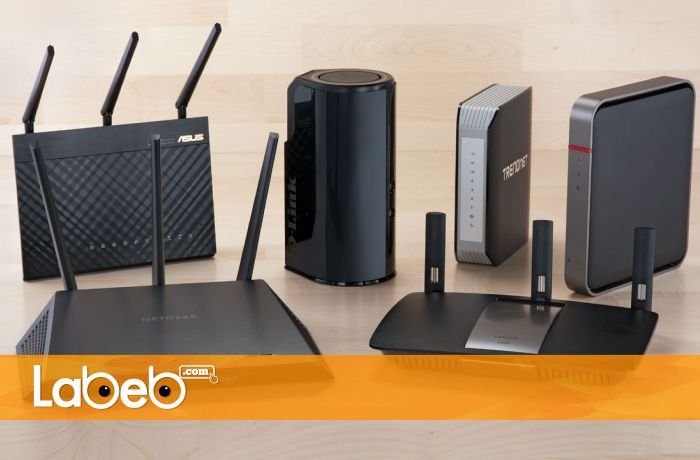
First: Number of antennas
The number of antennas resembles the routers ability to distribute waves, but that is not a necessary factor, you must check the routers specifications separately since the producing company may have added antennas as a form of design.
You may find antennas with one, two, and even four antennas.
Second: Router range
The routers range does not only depend on the ac standard, but it also depends on the routers ability to amplify the signal. The more it does that the more range it will cover. If you have a home with 3 rooms with a space of 120 square meters, then all new routers will perform well.
Third: Router boosters and extenders
In cases where the signal does not reach everywhere around the house for some reasons, like many cement walls or floors, then Labeb advices you get a booster and extender for your router which is also known as Range Expander or Multiplier.
Fourth: Where to place the router
Commonly, people place the router at the center of the home to reach all rooms equally, therefore there will be no need for a range expander (unless there is a big area to cover). If there is a desktop or a personal computer, we advise you put the router in the same room and connect it to the computer directly.
Tips for Router Place
- Place the router in an elevated place.
- Avoid surrounding the router with metallic objects.
- Do not leave the router next to a microwave so they do not mix signals.
- Do not leave the router in a crowded place which reduces the signal due to the water in human bodies.
- Sealing’s transmit signal better than walls, so the signal can move to different apartments even on a different level.
- In cases where cement walls are available, the signal will be reduced as they absorb signals.
To summarize
In conclusion, do not purchase a router before knowing what you need, starting with the standard, speed, port, USB port, and number of antennas. You can also consider our advice on where to place the router for a better signal.
- [[PropertyDescription]] [[PropertyValue]]